Fingerprint access, owned by the door.

One OEM ekey module fingerprint scanner. Three interchangeable backends that answer the same API. One Home Assistant integration that manages people rather than devices.

The backend owns the users, the automations and the access log — so a recognised finger still opens the door while Home Assistant is stopped, updating, or broken.

At a glance

Four deliverables built around a single shared app core. Line counts are approximate and measured from the source tree with comments and blank lines excluded.

3backends answering one API
~5,300lines of shared portable C
~16,000lines of C in the daemon tree
~5,100lines of C in the firmware
~5,800lines of Python in the integration
~2,000lines of panel JS, zero dependencies
5action types the door can fire
100events in the on-device access log

Architecture

The scanner speaks an encrypted RS485 protocol to exactly one host. Which host that is — a Linux box, a Home Assistant add-on container, or a microcontroller bolted to the door — is a deployment choice, not a different product. All three compile the same app core and serve the same pages.

ekey module fingerprint scanner OEM sensor · up to 10 finger slots per user
One shared app core — portable C behind a platform vtable
Linux daemonsystemd on any Debian host
Home Assistant add-onSupervisor container, ingress
ESP32-C6 firmwareno Linux host at all
Actions out: LED MQTT KNX Webhook GPIO
ekey module App Home Assistant custom integration, installed through HACS
Home Assistant sidebar panel · entities · events · blueprints · logbook
Why it is one core and not three codebases. The users, the finger slots, the access log ring and the rule engine are written once in portable C with no OS calls, behind a platform vtable. The daemon builds it as a static library; the firmware compiles the same files. The web UI is byte-identical across all three and adapts at runtime by reading GET /app/v1/capabilities — which is derived from the build, so it cannot claim a feature the binary does not have.

See it work

One unedited recording, start to finish: the device's own web UI at fp-sensor.local is used to configure an action, bind it to a recognition and enrol a finger — and then a touch on the sensor switches a real KNX actuator, with a KNX controller open alongside to confirm the frame actually landed on the bus. Home Assistant is not involved in any of it, which is the point.

Configuration, enrolment and a live recognition, 1 min 40 s. Recorded against the device's own web UI over HTTPS on the local network.
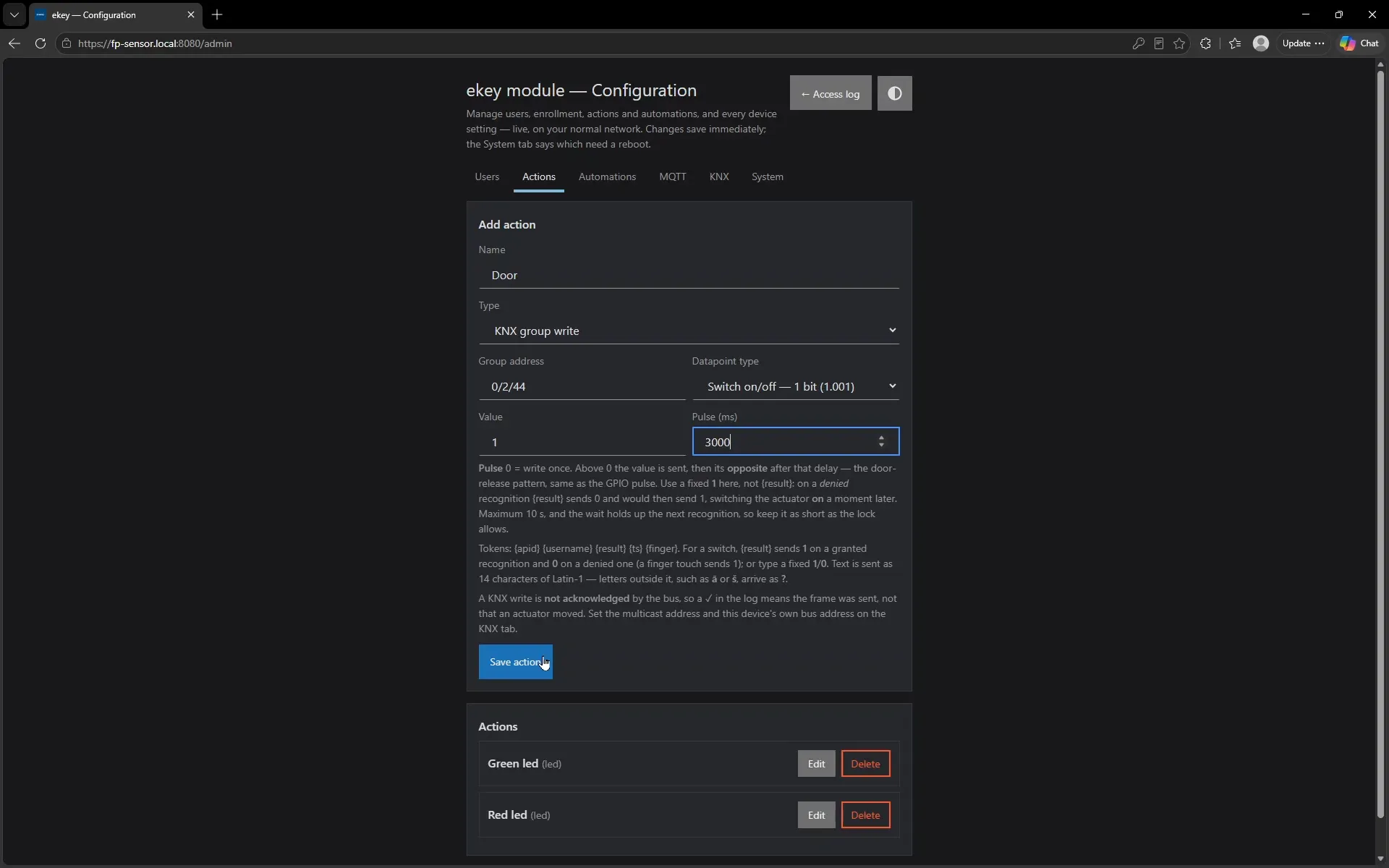
  1. The Actions tab of the device configuration page, defining a KNX group write to address 0/2/44 with a 3000 millisecond pulse.
    Step 1 · 0:25 Define what the door does. A KNX group write to 0/2/44 with a 3 s pulse — the value is sent, then its opposite after the delay. The same form also offers LED, MQTT, webhook and GPIO.
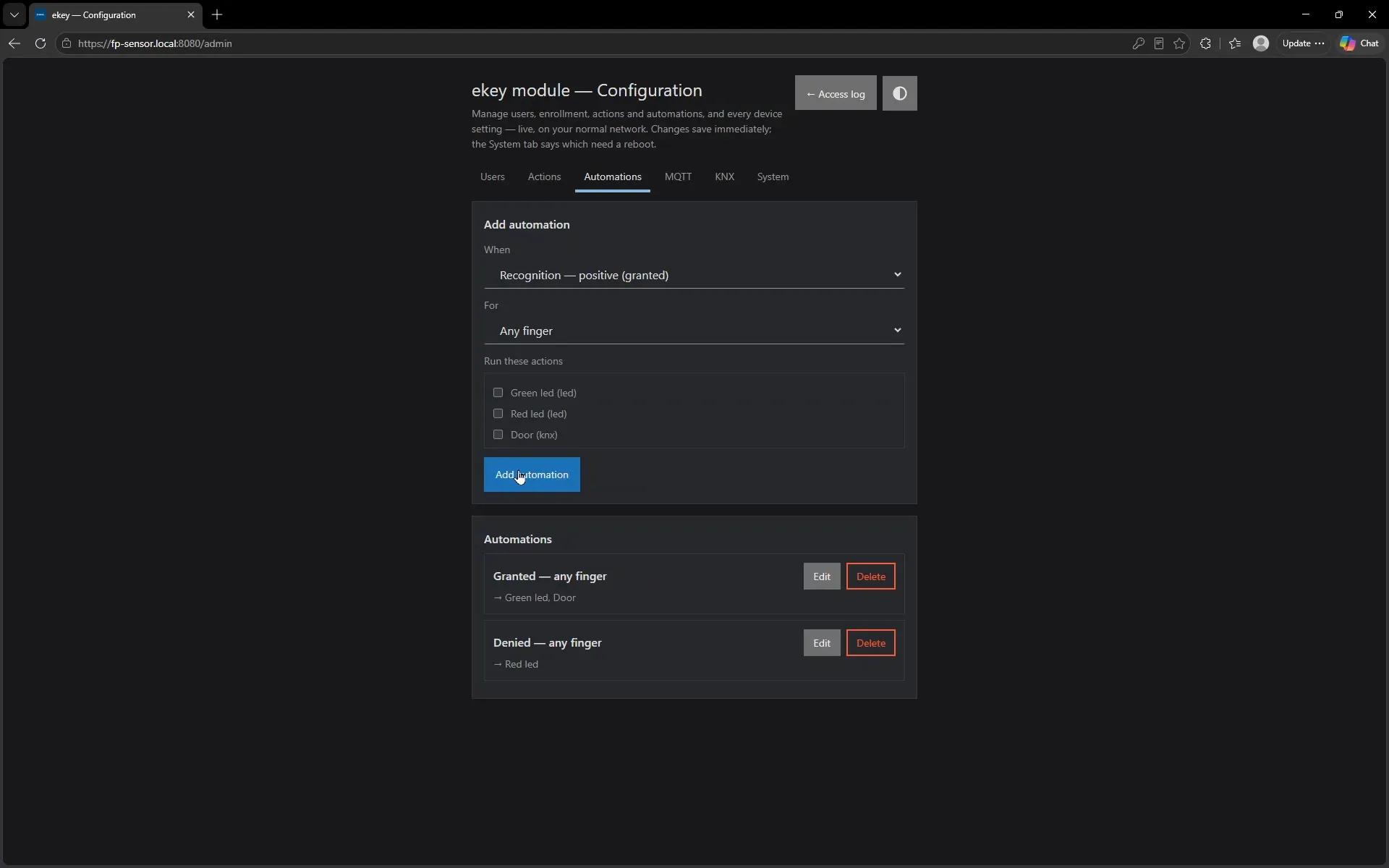
  2. The Automations tab, creating a rule: when recognition is positive, for any finger, run the Green led and Door actions.
    Step 2 · 0:32 Bind it to a recognition. When recognition is positive, for any finger, run Green led and Door. A second rule already fires Red led on a denial. This rule engine runs on the device itself, not in a home automation server.
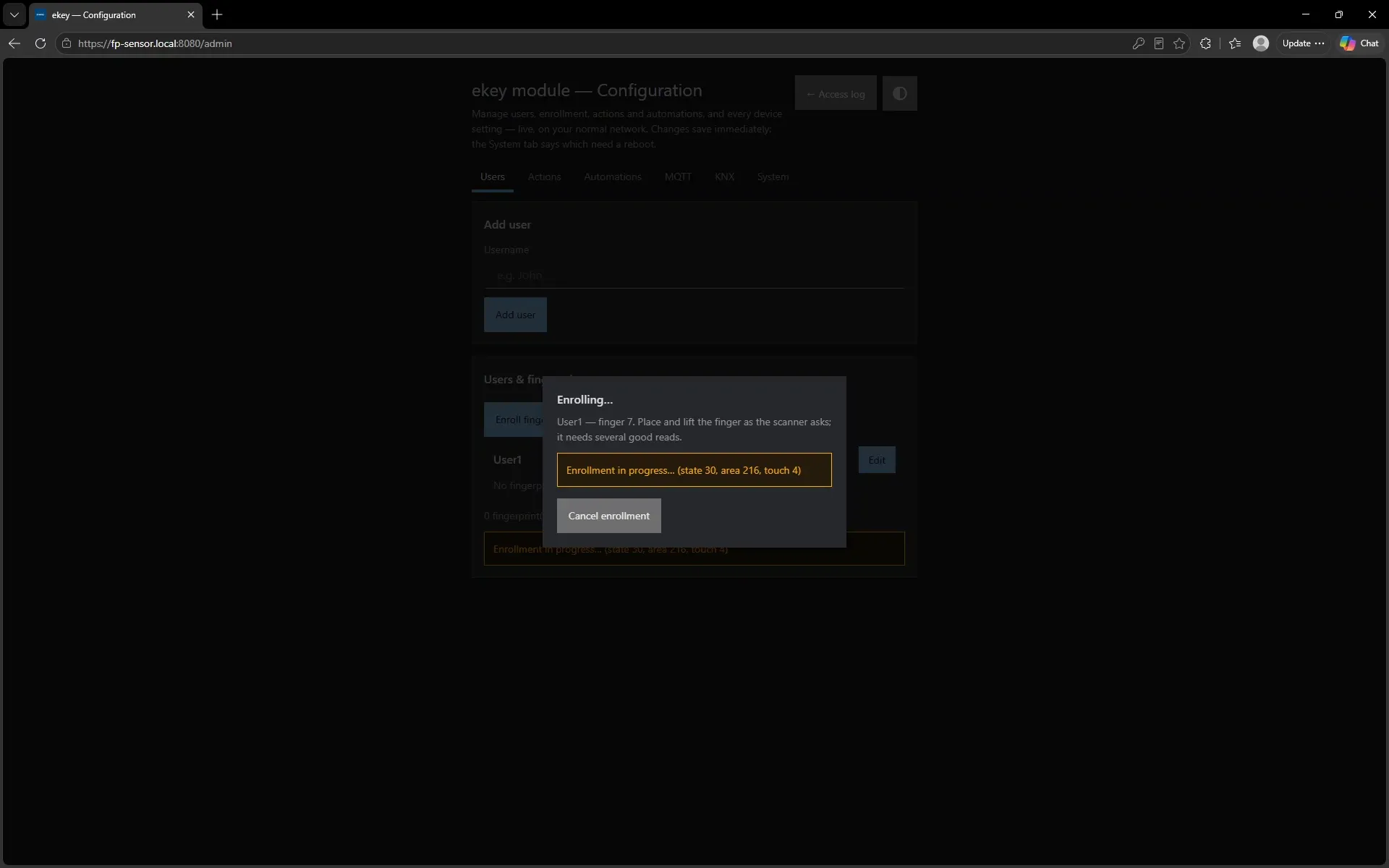
  3. The enrolment dialog showing live progress: User1, finger 7, enrollment in progress, state 30, area 216, touch 4.
    Step 3 · 0:55 Enrol a finger. User1, finger 7. The dialog reports the sensor's own progress as it happens — state, area covered and which touch it is on — rather than a spinner that means nothing.
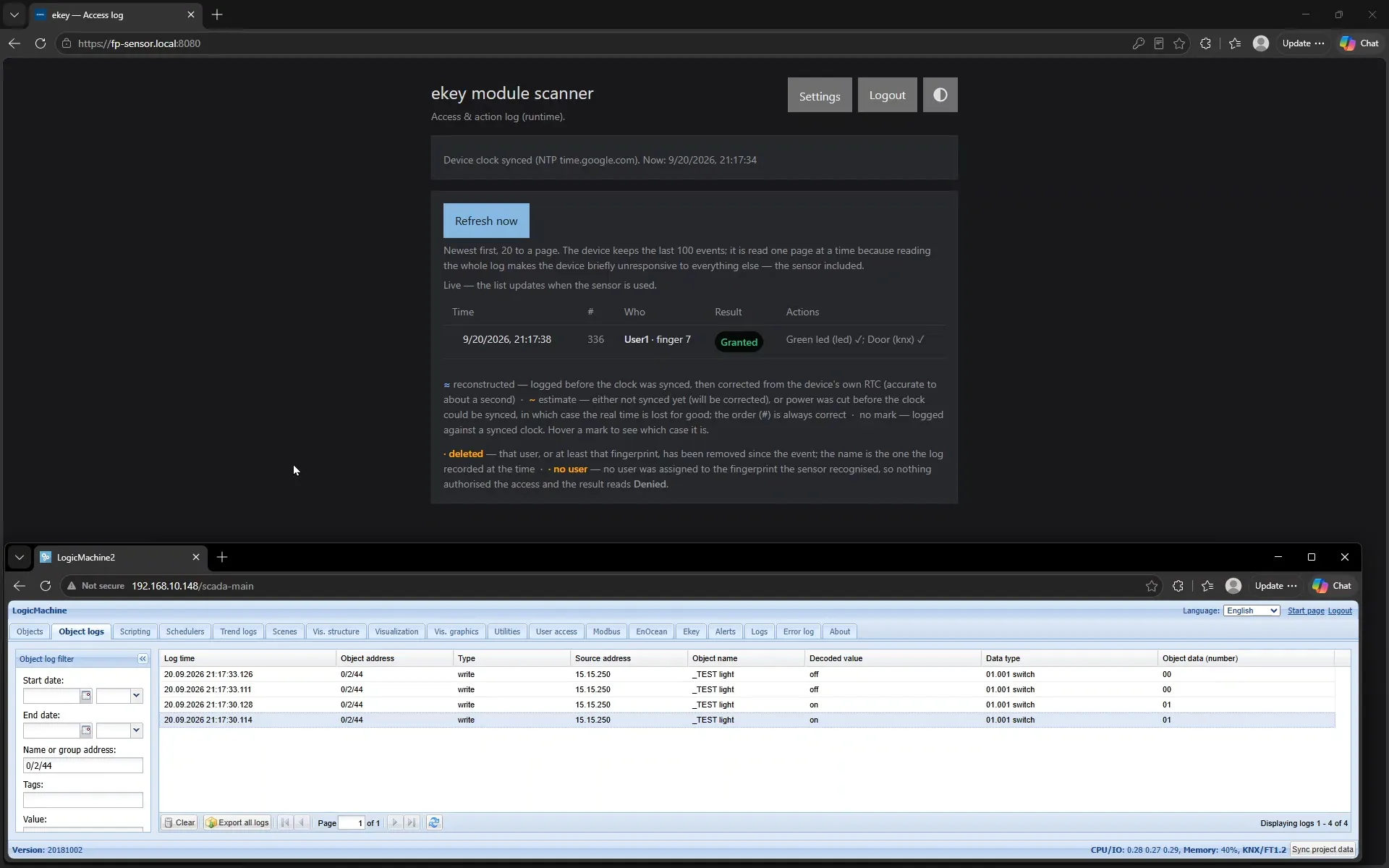
  4. The access log showing User1 finger 7 Granted with both actions ticked, and a KNX controller below showing the matching on and off writes to 0/2/44.
    Step 4 · 1:25 Touch the sensor. The log records User1 · finger 7 — Granted, with Green led ✓ and Door (knx) ✓. In the KNX controller underneath, 0/2/44 goes on and then off three seconds later — the pulse, on the real bus.

On the bench

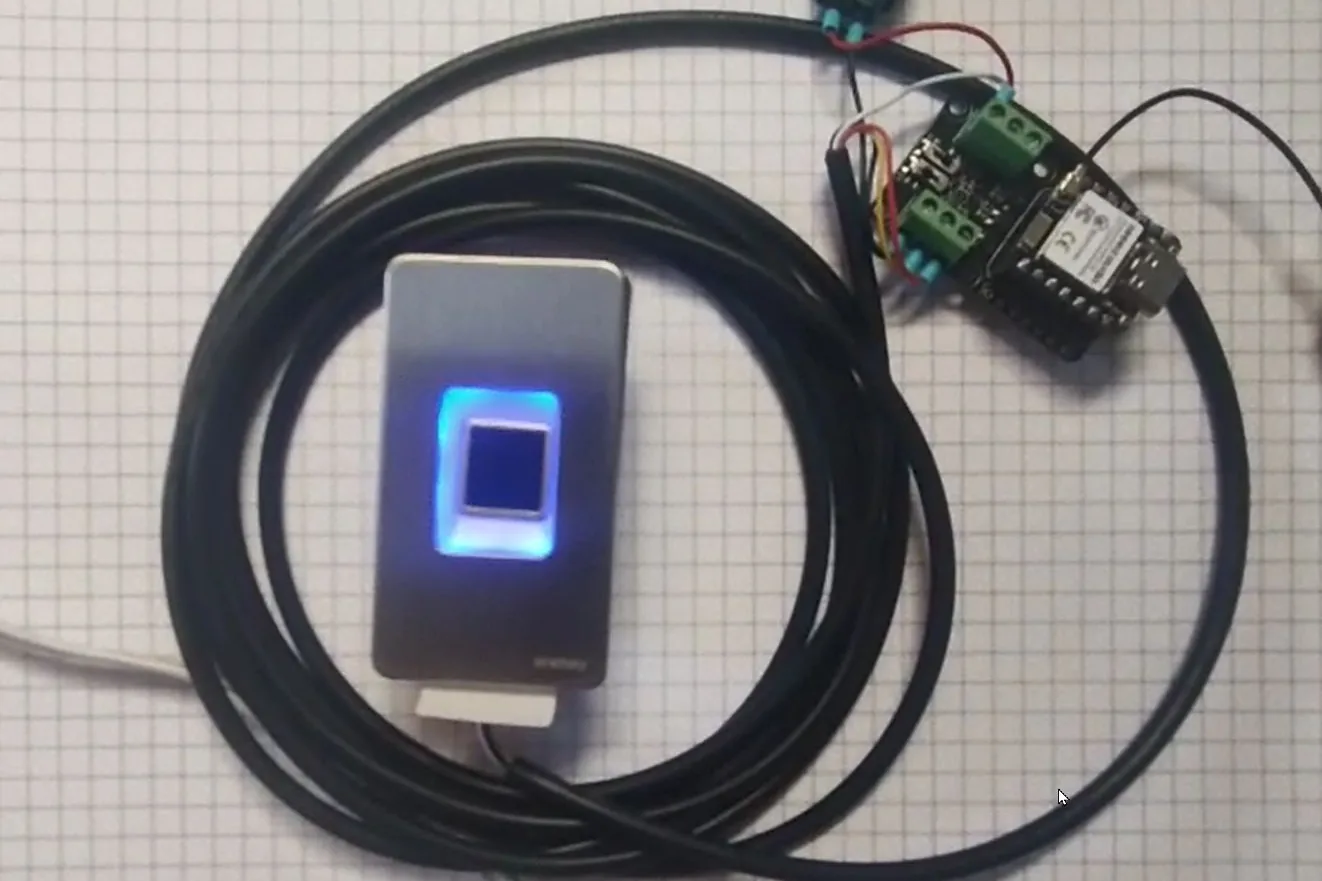
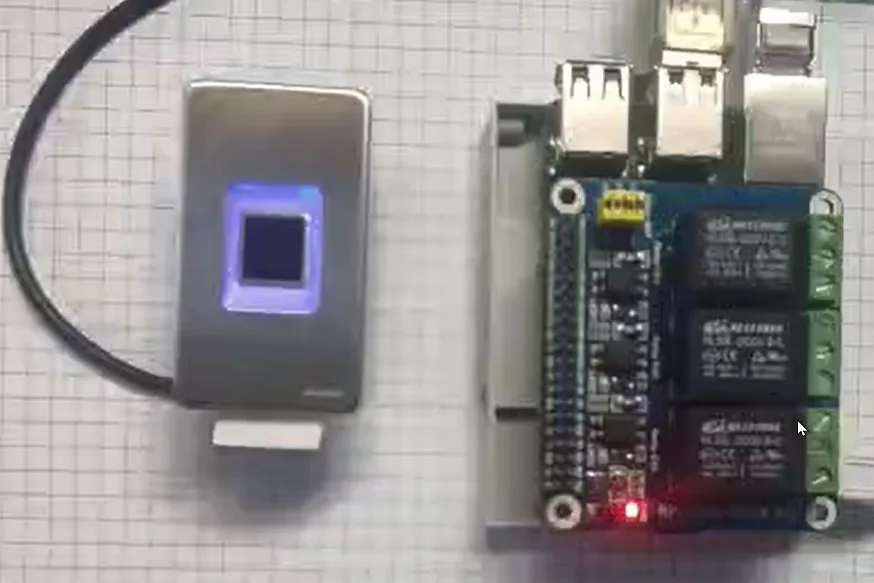
The same scanner, the same API, two different backends behind it. What changes between these two photographs is everything the rest of this page is about; what does not change is the device on the door.

The four deliverables

Each one reads in the same order: what it is, what it does, what it is built from, and the one design decision worth defending.

Linux daemon

ekey-ha-daemon/ source of truth

What it does

  • Bridges the RS485 scanner to a local REST + SSE API on any Debian host.
  • Owns users, finger slots, automations and a 100-event access log — no cloud, no broker required.
  • Fires five action types on a recognised finger: LED, webhook, MQTT, KNX and GPIO.
  • Two KNX transports: KNXnet/IP routing, or FT1.2 to a BAOS module on the Pi's own UART, which gives acknowledged writes without a KNX IP router.
  • Optional HTTPS with a self-signed EC certificate, mDNS service advertisement, and a serial port that is a runtime setting rather than a compile-time constant.

Built from

Language
C99, pthreads
HTTP
libmicrohttpd (+ TLS)
Crypto
Mbed TLS
Optional
libcurl, libmosquitto
Service
systemd unit, also OpenRC
Split
closed .so · shared .a · open binary

A missing optional library is not a build failure. It becomes "unsupported, with the reason" in the capabilities response, hidden in the UI, and refused at save time.

The decision worth defending: a dedicated action worker thread. A KNX action with a five-second pulse used to run inside the RS485 poll loop and stalled the scanner link for its whole duration. Actions now go onto an eight-deep queue drained by their own thread, and a full queue drops loudly with a running total rather than silently falling behind.

Home Assistant add-on

ekey-ha-addon/ → agrisvi/ekey_module_addon v1.2.10

What it does

  • Ships the same daemon as a Supervisor-managed container for Home Assistant OS, for aarch64 and amd64.
  • Installs from a public store repository that carries metadata only — no Dockerfile and no sources.
  • Pulls a prebuilt image, so nothing is compiled on the user's Raspberry Pi.
  • Serves its configuration and log pages through ingress, inside the Home Assistant UI, with no port to open.
  • A health watchdog restarts the add-on when the scanner link goes down.

Built from

Base
Debian Bookworm HA base image
Build
two-stage Dockerfile, GHCR
Runtime
bashio startup script
Startup
services, ahead of Core's config entries
Access
host network + udev, for by-id serial paths
Options
4, with a device picker for the port
The decision worth defending: ingress_stream: true. Without it the Supervisor buffers the response body, the Server-Sent Events stream never reaches the browser, and the log page simply stops updating — with no error anywhere. One flag in config.yaml, and the rest of the file is mostly the written reasoning for choices exactly like it.

ESP32-C6 firmware

ekey-ha-esp32/ v0.1.0

What it does

  • Runs the whole daemon on a Seeed XIAO ESP32-C6 with an RS485 expansion board — no Linux host anywhere in the system.
  • Serves the same REST + SSE API over HTTPS with a Bearer token, from a self-signed EC certificate generated on the device.
  • Two first-boot provisioning paths live at once: a SoftAP captive portal and Improv over BLE. Both verify the Wi-Fi credentials before saving them.
  • Runs the rule engine, MQTT publishing and KNXnet/IP on the device itself.
  • Internal or external U.FL antenna, selected in software and applied before RF calibration.

Built from

Framework
ESP-IDF, FreeRTOS
HTTP
esp_https_server
Crypto
Mbed TLS on C6 hardware AES/SHA/ECC
BLE
NimBLE, released after provisioning
Storage
NVS + LittleFS
Discovery
mDNS, ekey.local

All settings live in NVS, so one binary ships to any site — no source edits per customer.

The decision worth defending: bad credentials cannot brick it. A Wi-Fi change is a thirty-second trial with automatic rollback; the BOOT button held for five seconds forgets the network; and forgetting the network also resets the antenna choice, because the two fail together. Factory reset needs the token twice and resets the sensor first — a refusal there aborts with nothing erased.

Home Assistant integration

agrisvi/ekey_module_app v1.2.6 · HACS

What it does

  • An admin-only sidebar panel: users, enrolment with live progress, adoption of fingerprints the scanner holds but nobody owns, and deletion confirmed by the sensor itself.
  • Connects either to a local daemon or add-on over HTTP, or to an ESP32 device over HTTPS with a token — validated before the entry is saved, with a reauth prompt when the token rotates.
  • Keeps a master copy of every fingerprint template, because a template cannot be re-derived from a finger that has already been enrolled.
  • Shows a presence matrix across scanners and offers Push, Adopt, Sync and Delete-everywhere as background jobs with per-item progress and a Stop that lands between fingerprints.
  • Exports passphrase-encrypted backups by default: scrypt plus AES-256-GCM, with an authenticated header.

Surface in Home Assistant

Entities
5 — device info, enrolled count, last access, LED green, LED red
Services
3 — enrol, delete, LED brightness
Events
14, with ekey_access_granted as the one to automate on
Blueprints
3 — relay, welcome notification, notification list
Panel
~2,000 lines of ES module, no build step
Class
local_push, via the SSE stream
The decision worth defending: nothing is ever pushed automatically. The vault knows which scanner is missing which finger, and it will tell you — but every write is a deliberate action, and success is read from the device's own verified field rather than from an HTTP 200. The entity list was cut from around fifteen to five for the same reason: a door is not a dashboard.

Who builds this

The software on this page is written and supported by one Latvian company, whose trade is ekey® biometric access control systems.

SIA "A.V.U. BS"

Registration
LV40003946449
Address
"Gaņģi", Ķekava parish, Ķekava municipality, LV-2123, Latvia
Web
avu.lv

Get in touch

Email
agris@avu.lv

Questions about the software, about fitting it to a building, or about the scanners themselves.

What the company does

Distribution and support of ekey® biometric access control systems, and the integration software that connects them to the controller a building already runs.